Digital pet health records for sharing with caregivers and vets
By AutoSEO

Keep digital pet health records organized and accessible. Learn how to easily share medical notes, vaccine logs, and instructions with pet sitters and your vet.
A record tucked away at home can’t help the person caring for your pet in the moment. Keep digital pet health records together in an app or cloud storage, share relevant details with caregivers and your veterinary practice, and keep a copy on your phone or in print for quick access.
It’s natural to want everyone involved in your pet’s care to find the information they need without searching through scattered notes or old messages. A well-maintained record brings vaccination details, medications, veterinary visit notes, and care instructions together in one accessible place.
This guide explains how to share records with sitters and vets, coordinate information with a veterinary practice, and keep details current as care changes. You’ll also learn how reminders can support routine care and what to keep close at hand, so everyone looking after your pet can stay informed and follow your instructions.
Key Takeaways
- Share the care details a sitter or family member needs, and keep veterinary visit notes, medication information, and vaccination records organized for your practice.
- Before connecting records with a veterinary practice, learn how it receives and adds information so updates can be entered consistently.
- Keep a copy of important records on your phone or in print, and choose a storage method that makes them easy to find when needed.
- Understand whether updates happen automatically or require you to add information, then make a simple routine for keeping records current.
- Compare services by the record-keeping and sharing features you need, and consider what affects the plan’s cost before choosing one.
How do the vaccination tracker and medication reminders work?
In the United States, applicable rules and clinic policies can shape veterinary recordkeeping. Practices may use different electronic formats and sharing processes, so ask your clinic how it receives owner-supplied files and records updates.
A vaccination tracker gives you one place to record vaccine details and upcoming care. After each veterinary visit, enter the date and relevant information, including vaccinations, prescribed medications, and health advice. Set phone or app reminders for vaccinations, check-ups, and other important milestones. For example, record the vaccine information after a clinic visit and set a reminder for the next appointment according to your veterinarian’s schedule.
Medication reminders can help caregivers follow the instructions you’ve recorded. Enter the medication name, the veterinarian’s directions, and any relevant timing notes. Share those details with everyone caring for your pet, including family members and a sitter. If instructions change after a follow-up visit, update the record and notify anyone with an earlier copy. A reminder supports your routine, but the written veterinary directions remain the reference for care.
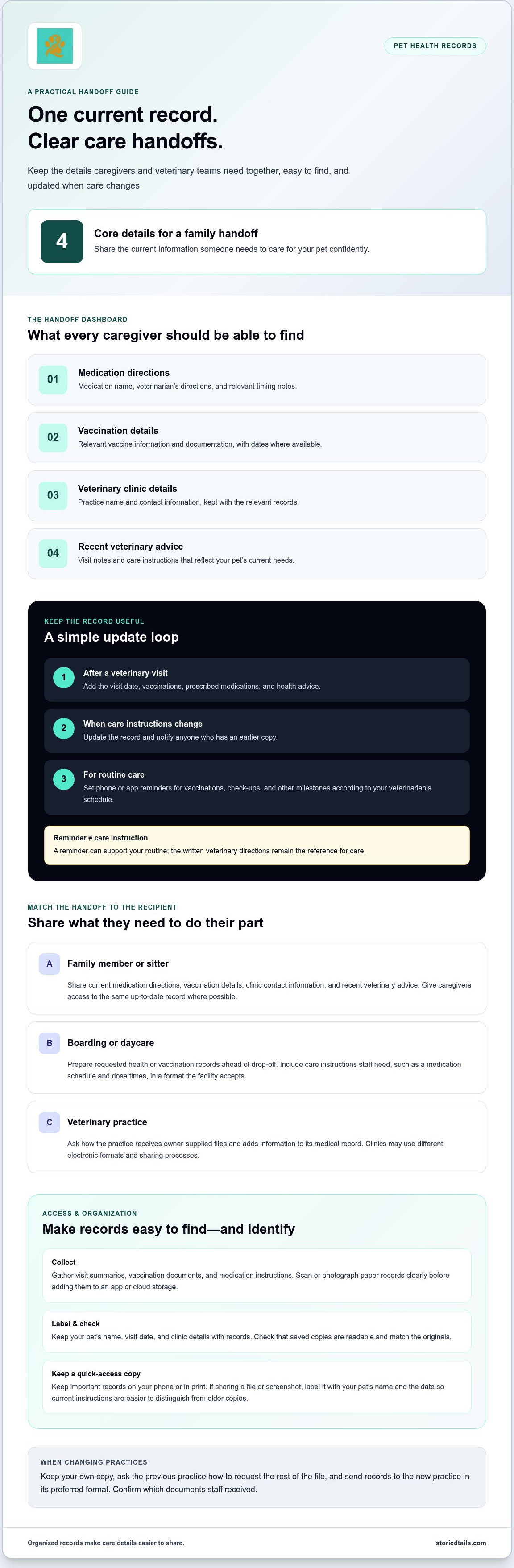
For a family handoff, share what someone needs to care for your pet confidently: current medication directions, vaccination details, clinic contact information, and recent veterinary advice. Give each caregiver access to the same up-to-date record where possible. If you share a file or screenshot instead, label it with your pet’s name and the date. That makes it easier to distinguish current instructions from an older copy.
Boarding and daycare providers may request health or vaccination information before a stay. Prepare the relevant records ahead of drop-off and share them in a format the facility accepts. Include your pet’s name, the clinic’s details, and care instructions staff need during the visit. For example, a boarding handoff can include vaccine documentation, the medication schedule, and dose times.
Before sending electronic records, make sure the recipient can open the file and identify your pet. A clear filename, such as “Milo vaccination record,” is easier to recognize than a generic attachment name. For a veterinary practice, include the visit date and clinic details, then ask how staff add owner-provided information to the medical record. Keep a copy on your phone or in print for emergencies, and update shared files whenever a visit changes the instructions.
Applicable rules and clinic policies can shape veterinary recordkeeping, but electronic formats and sharing processes vary by practice.
Connecting records with a veterinary practice
U.S. veterinary practices may use different systems and record-sharing procedures. Ask your practice how to send, receive, and add information, and follow its instructions for your pet’s files.
There isn’t one electronic format that every U.S. practice uses. Applicable requirements can depend on location and clinic policies, so ask how records are maintained and shared.
Transferring Records Into an App
To transfer veterinary records into a digital pet health app, gather the files you already have, such as visit summaries, vaccination documents, and medication instructions. Add them using the app’s available upload or entry options, then check that each file shows your pet’s name and visit date.
If a record exists only on paper, scan or photograph it clearly before adding it. For example, make sure a vaccine label and its date are readable, then compare the saved copy with the original. Keep the clinic name and contact details with the record so you can identify its source.
Moving or Changing Veterinarians
When you move or change veterinarians, keep your own copy of your pet’s records and ask the previous practice how to request the rest of the file. Share the records with the new practice in its preferred format, such as an electronic file or printed copy, and confirm which documents staff received.
For example, if your pet takes ongoing medication, include the latest visit notes and current directions. Keep original files organized by date, and add records from the new practice as care continues. This preserves a useful history even when clinics use different record systems.
Before connecting an app with a practice, clarify whether the clinic can send records directly or expects you to provide them. Ask whether the practice adds owner-submitted documents to its medical record or keeps them separately. Knowing this helps you understand what the app stores and what the clinic can access.
Make the handoff easy to use: identify your pet, include relevant visit dates, and state whether the file contains vaccination history, medication details, or other records. If the clinic returns a revised or corrected document, replace the outdated copy in your collection and note the date of the change.
For a move, save a copy that you can access independently of a clinic’s system. Keep important documents together, and prepare a concise summary of current care for the first appointment. A dedicated record-keeping space can help keep a pet’s health history organized alongside ongoing care notes.
On-demand access to pet health records
Create a digital health record by gathering veterinary documents, entering key details, and saving them in an app or cloud storage. Organize records by type and date, then keep a copy on your phone or in print for emergencies.
Start with information that identifies your pet and helps explain their care. Include your pet’s name, a clear photo, veterinary practice details, and relevant health records. Add visit summaries, vaccination documents, medication instructions, and advice from appointments. For example, label a visit summary with its date and clinic name so you can find it without opening several files.
Choose an organization system that’s easy to use on a stressful day. Group documents under labels such as “Vaccinations,” “Medications,” and “Veterinary Visits.” Within each group, use dates and descriptive filenames, such as “Milo visit summary, October.” That’s easier to navigate than a collection of files named “document” or “scan.”
For quick access, store records in an app or cloud system that keeps information together and lets you share it. Save important files on your phone too, since cloud access may depend on an internet connection. A printed copy is another option if a device is unavailable or a caregiver needs paper documentation.
Before an appointment or handoff, open the saved files and make sure they’re readable. Check that a photo of a paper vaccination record clearly shows the dates and clinic information. If medication instructions have changed, remove or mark the outdated version in your collection so it won’t be mistaken for current guidance.
Keep the most useful information easy to find. A short summary can point to current medications, recent veterinary advice, and supporting documents. A caregiver should be able to locate relevant care notes without searching through unrelated files. Keep fuller visit histories available for your veterinary practice.
Review the collection after each veterinary visit. Add the new summary, update relevant notes, and retain earlier records to preserve your pet’s health history. If you use both an app and printed documents, update each copy when details change. This helps prevent an old paper record from contradicting the current digital file.
Protect access while keeping records usable. Secure your device with a passcode and share only the information each caregiver needs. Before a trip, check that the files open on your phone and prepare a printed copy if needed. A small, organized set of records makes handoffs to family, a sitter, or a veterinary team clearer.
Automatic record synchronization
Automatic synchronization keeps changes aligned across connected devices or locations. If you add a veterinary visit on your phone, a syncing service can update the same record elsewhere after the change uploads. The feature depends on the app and connected accounts; it doesn’t mean every clinic record automatically appears in your collection.
Keep three kinds of information distinct: details you enter, files you upload, and documents sent by a veterinary practice. For example, adding a medication note yourself won’t automatically import the clinic’s appointment summary. Direct exchange between an app and a practice requires both systems to support it. Synchronization between your devices and transfers from a clinic to an app are separate processes.
Before relying on a synced record, decide which copy you’ll update. Use one main account for your pet’s profile, then invite caregivers through the app’s sharing options if available. If you and a family member both edit the same medication entry, the service may show two versions or apply one change after the other. Agreeing that one person enters veterinary updates, for instance, helps prevent conflicting notes.
Follow a consistent update routine after each appointment. Add the visit summary, attach documents, and compare the saved entry with the clinic’s instructions. If a veterinarian changes a medication direction, update the current note and remove or clearly mark the old direction. Then open the record on another connected device to confirm the change has appeared.
- Confirm that the newest visit date appears on each connected device.
- Open an uploaded file to ensure it remains readable.
- Review medication notes for old or duplicate directions.
- Keep a separate copy of important records on your phone or in print.
These checks can reveal a paused upload, a device that’s signed out, or a file that didn’t attach. If a phone is offline, a recent change may not reach other devices until the connection returns. Don’t assume an update has synced just because you can still see it on the device where you entered it. Reopen the account when connected and confirm the new information is there.
Sharing permissions matter too. A caregiver may need to view a vaccination document without editing the full health history. Use the access options available in your chosen service, and remove access when someone no longer helps with care. After a boarding stay, for example, review who can still see the shared record and whether a copy should remain available.
Automatic synchronization supports continuity, but it doesn’t replace record reviews. Keep essential information accessible on your phone or in print, and compare entries after important veterinary visits. This helps keep connected copies useful for family members, caregivers, and your veterinary practice.
How much do digital pet health record apps and services cost?
The cost depends on what a record app or service includes, so compare features before choosing. A basic record for one pet has different needs from a shared system used by a household with several caregivers.
Start by listing the tasks you need the service to support. You may want to store veterinary visit notes, add vaccination documents, set reminders, or share records with family. If you only need a place to keep files, for example, a service focused on record storage may suit you better than one with additional care-management tools.
Next, consider how many pets and people need access. A household caring for one dog may need a single profile, while a family with several pets may want separate histories and caregiver access. Check whether the plan covers those needs and whether adding a pet or user changes the terms.
Storage and sharing options also affect a service’s usefulness. Review how records can be uploaded, downloaded, viewed on different devices, and shared with a veterinary practice. If you need printed copies, confirm that files can be saved in a printable format. A feature list helps you compare services by how you’ll use them, rather than by a long list of extras.
For a tailored record-management service, the price depends on the case and is provided after a quote request; relevant factors include the number of pet profiles, the record-management features needed, and sharing requirements. This distinguishes a service shaped around specific needs from an app with a set package.
Before deciding, list your essential features and compare them with each service’s terms. Consider whether you need reminders, document storage, caregiver access, or a way to keep records together over time. If a veterinary practice receives files by email, for instance, direct clinic integration may not be necessary for your routine. Focus on the functions you’ll use.
Read the plan details for limits on profiles, storage, sharing, and access. Note whether a subscription renews and how you can retrieve records if you stop using the service. These practical details matter because your pet’s history should remain useful through changes in care, caregivers, or veterinary practices.
Choose a service based on the records you need to manage, the people who need access, and the way you prefer to keep copies. If organized pet health records would help your household, explore pet health record management as one way to keep care information together.
StoriedTails: Digital pet memorial and community hub
StoriedTails combines pet health record management with a place to honor the bond you share with your pet. Use it to keep care information organized while preserving the memories and stories that matter to your family. The Living Pets community centers on pets and their ongoing stories, while the digital memorial and community hub helps celebrate a pet’s life and legacy.
You can organize practical records for a living pet and, when the time comes, preserve meaningful memories in a memorial space. These offerings complement your care routine without replacing veterinary guidance or treatment.
Visit storiedtails.com to explore StoriedTails’ pet record and remembrance offerings.
Carry your pet’s care forward
A well-kept record can become part of the thoughtful care you provide over time. It helps the people close to your pet understand their needs and preserves details that might otherwise fade from memory. As you maintain digital pet health records, consider how to keep practical notes and meaningful moments connected through changes in care.
StoriedTails combines pet health record management with a digital pet memorial and community hub, including Living Pets for stories about pets who are part of your life now. These offerings support both the everyday work of caring for a pet and the lasting importance of honoring your bond.
If you’d like to explore a record-keeping space for your pet, contact StoriedTails to discuss pet records. A small step toward organizing their story can help you carry their care with greater intention.
Frequently Asked Questions
How can I share my pet’s records with others?
Share a current copy in a format the recipient can open, such as an attachment or printed handoff. For a weekend caregiver, include the information needed during their stay rather than sending an entire history. Add your pet’s name and the document date, then confirm the recipient received it. If care instructions change, send the revised version directly so an older copy isn’t mistaken for current guidance.
Does this mean I can throw out my paper record?
No, keep paper records as a backup while you build and maintain a digital copy. Store them in a labeled folder with clinic documents so you can find them if your phone is unavailable or a saved file won’t open. After adding a paper document to your digital collection, compare the copy with the original to ensure dates and instructions are readable.
How do you connect to my vet?
Connecting a record with a veterinary practice usually starts with the clinic’s preferred way to receive information. Contact the practice through its usual communication channel and ask where to send the file, such as a patient portal or email. Include your pet’s name and appointment date. If the clinic uses a printed intake form, bring a concise summary and supporting documents to the visit.
How secure is my pet’s health data?
Security depends on both the service holding the files and how you manage access. Use a strong, unique password for your account, protect your phone with a passcode, and avoid posting health documents in public groups. Share only the records each caregiver needs. A sitter may need medication instructions, for example, while a veterinary team may need a broader medical history.
What are digital pet health records and what information do they include?
Digital pet health records are electronic notes and documents that keep care information together. They can include veterinary visit summaries, vaccination details, prescribed medication instructions, and advice from appointments. You can also organize practical notes about diet or exercise alongside care records. A dated visit summary, for example, can help you recall which clinic provided guidance and what information belongs to that appointment.
Can veterinarians access or share digital pet health records?
Veterinarians can use records you provide through a method their practice accepts, but an app doesn’t automatically give every clinic access. A practice may add submitted documents to its patient file or keep them separately. To send records between clinics, ask the receiving practice what it needs, provide the relevant documents, and identify their dates and source.
Are digital pet health records secure and how is pet owner data protected?
Pet records and owner account information both deserve careful handling, but protection depends on the service’s safeguards and your account habits. Use a distinct password, keep your device locked, and limit sharing to people involved in care. Avoid including unrelated personal details in a record or message. When a caregiver no longer needs access, remove their shared access where that option is available.