How to Make a Personal Pet Memorial Video Tribute
By AutoSEO
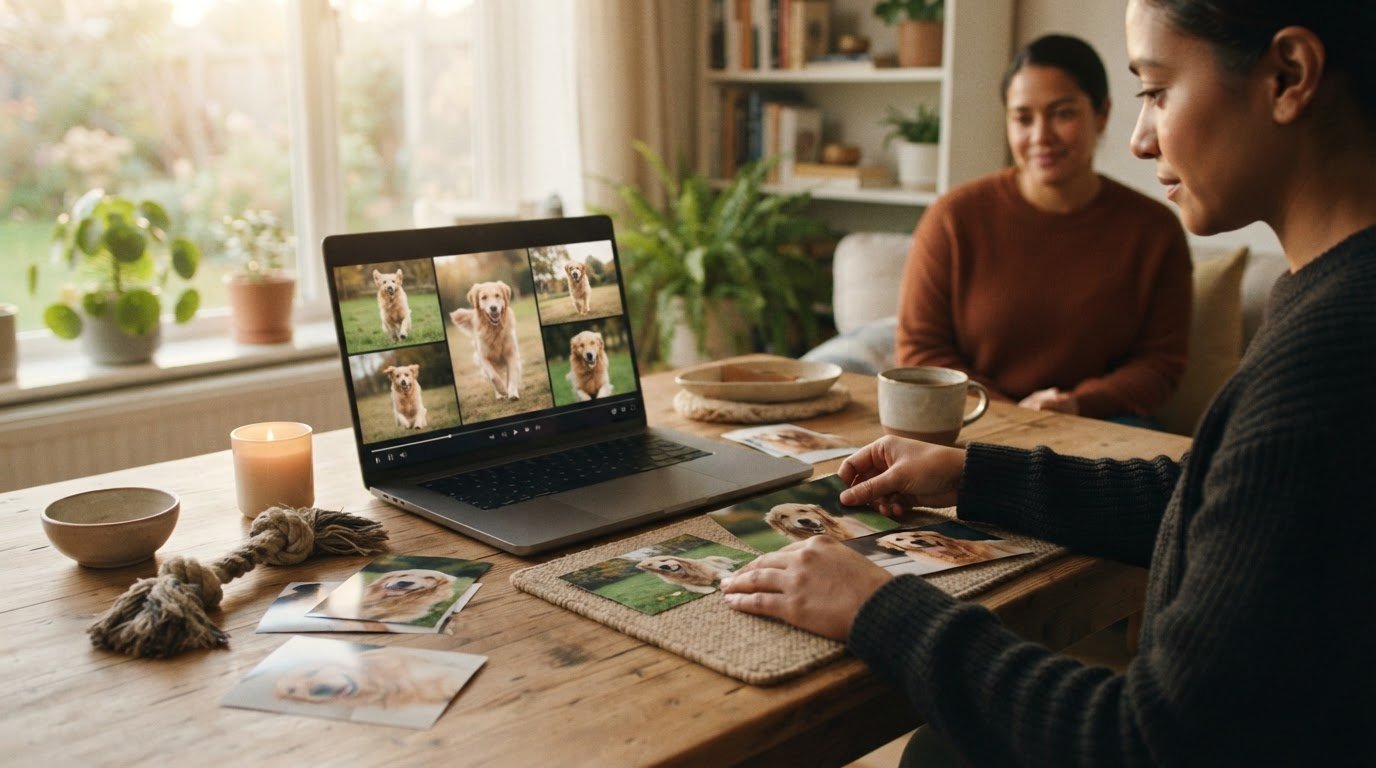
Explore pet memorial video ideas and learn to create a heartfelt tribute with photos, music, captions, and loved ones’ stories to share and cherish.
To make a personal pet memorial video, choose photos and short clips from different stages of your pet’s life, arrange them in a simple sequence, and add music, a few words, or recorded memories. A tribute often works well at three to five minutes, with pet memorial video ideas that include everyday moments as well as milestones.
The most heartfelt part may be a voice recalling the small things: paws on the floor, a favorite resting place, or a familiar welcome at the door. It’s natural to want every memory in the video, but a few well-chosen images and stories give each moment room to resonate.
This guide explains how to gather candid photos, add short clips and recorded stories, and shape the tribute with gentle captions and music. You’ll also find practical ways to share the finished video privately with family and friends, creating a keepsake that honors the life you shared.
Key Takeaways
- Choose candid photos and clips from different stages of your pet’s life to create a tribute that feels personal and complete.
- Use gentle animation to add movement while keeping attention on the memories rather than the effects.
- Invite loved ones to record brief stories, so familiar voices and small details become part of the tribute.
- Pair photos and footage with soft music, simple captions, and a few meaningful words.
- Choose a private way to share the finished video with family and friends who knew your pet.
Selecting photos and clips from across a pet’s life
A pet memorial video often works best at three to five minutes. Choose images and clips that show your pet’s personality across different years, not only their final months.
-
Gather and Back Up Photos and Videos
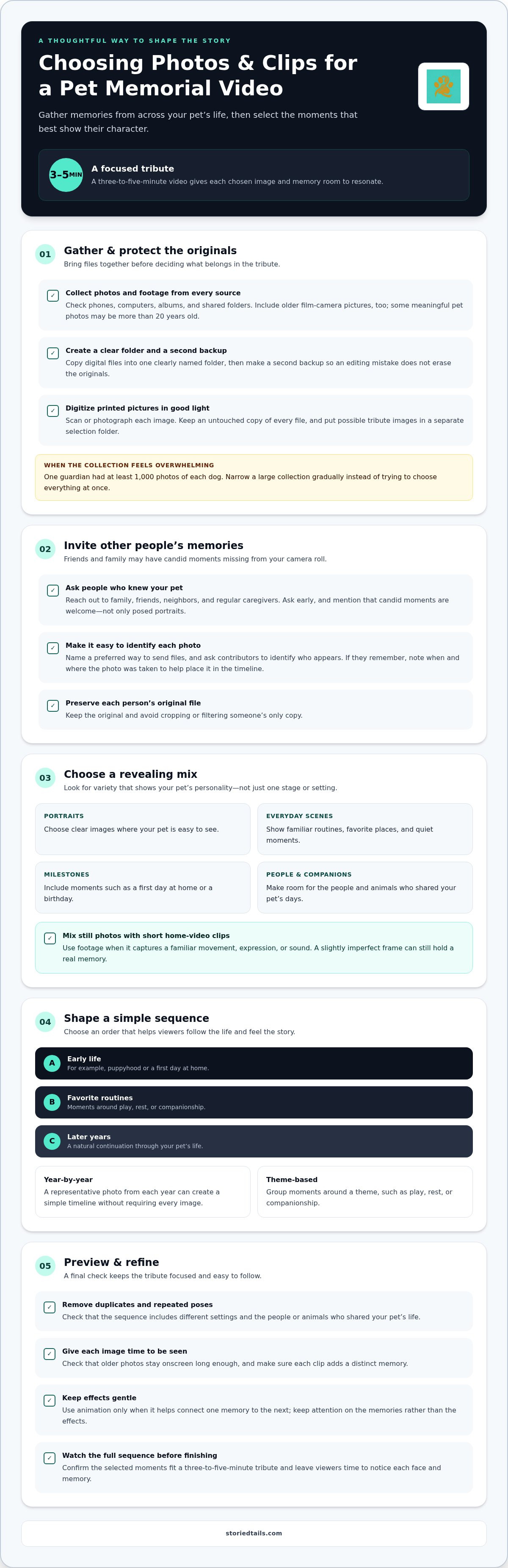
Start by collecting your pet’s photos and footage from phones, computers, albums, and shared folders. Copy digital files into one clearly named folder, then make a second backup so an editing mistake doesn’t erase the originals. For printed pictures, scan or photograph each image in good light. Include older film-camera pictures, too; some meaningful pet photos were taken more than 20 years ago.
Sort the collection into simple groups, such as puppyhood, favorite places, daily routines, and family gatherings. A guardian with at least 1,000 photos of each dog may need to narrow the choices gradually. Keep an untouched copy of every file, and place possible tribute images in a separate selection folder.
-
Collect Photos from People Who Knew the Pet
Ask family members, friends, neighbors, and regular caregivers for photos while you gather your own. Send the request early, and say you’d especially welcome candid moments rather than posed portraits. Someone may have a snapshot of your dog greeting guests or your cat beside a familiar chair, adding details missing from your camera roll.
Make it easy for people to contribute by naming a preferred way to send files and asking them to identify who appears in each photo. If they remember, ask when and where it was taken; those details can help place it in the timeline. Keep each contributor’s original file, and avoid cropping or filtering their only copy.
-
Choose Photos and Home Videos
Choose a mix of portraits, everyday scenes, and milestones that reveal your pet’s character. You might include a first-day-at-home photo, a favorite walk, a birthday, and a quiet nap in a sunbeam. One practical approach is to select a representative photo from each year of your pet’s life. This creates a simple timeline without requiring every image.
Favor clear images where your pet is easy to see, but don’t reject a slightly imperfect frame that holds a real memory. Add short home-video clips when they capture a familiar movement, expression, or sound. For a slideshow, alternate still photos with brief footage, and use gentle animation only when it helps connect one memory to the next.
- Arrange the selected images in a natural order, such as early life, favorite routines, and later years. Check that repeated poses don’t crowd out different settings or the people and animals who shared your pet’s days. A year-by-year sequence helps viewers follow the story, while a theme-based slideshow can group moments around play, rest, or companionship.
Preview the sequence before adding finishing touches. Remove duplicates, check that older photos stay onscreen long enough, and confirm each clip adds a distinct memory. Keep the selection focused enough to fit a three-to-five-minute tribute, leaving viewers time to notice each face and moment.
Sharing tributes with family or embedding them online
Decide how you’ll share the finished tribute before sending it to loved ones. A private link, a downloaded video, and a public post suit different audiences.
- First decide who should be able to view the video, then choose a sharing method to match. An unlisted link can be shared privately with family and people who knew your pet. Send it directly rather than posting it publicly. For example, share the link in a family message with a brief note about the memories behind the tribute.
Before sharing, watch the video from beginning to end and check the title, captions, and closing image. Make sure it doesn’t include details you’d rather keep within the family, such as personal messages or private photos. If relatives contributed images, let them know how their memories appear in the finished video.
- Download the completed video and save a copy somewhere easy to find. Use a clear filename, such as “Milo memorial video,” rather than a camera-generated string of letters and numbers. Save the finished version separately from the original photos and clips, so you can distinguish the tribute from the source files.
Keep another copy in a separate location, such as a different device or a trusted storage account. This gives you another way to revisit the video if the first device is lost or replaced. Open the saved file once to confirm its images, recorded audio, and music play intact.
- Send the link with a personal message that tells recipients what they’re opening. You might write, “We gathered some of Luna’s favorite moments, including her visits to the lake.” A specific detail makes the invitation feel warm without putting pressure on anyone to respond.
Consider sending the tribute individually to relatives who shared a close bond with your pet. For a wider circle, a small group message can bring together friends, caregivers, and neighbors who remember the same routines. Give people time to watch when they’re ready, especially if the video may stir strong feelings.
- If you want the tribute to remain part of an ongoing remembrance, place it in a dedicated digital memorial space alongside your pet’s story. A digital pet memorial and community hub can give families a shared place to honor memories beyond a single video link.
For an online embed or public post, choose a version you’re comfortable sharing beyond your immediate circle. Review names, faces, and personal details first, then add a short caption that identifies your pet and the meaning of the tribute. Keep your private download even when you share another version online.
Making a slideshow more dynamic with animation
Use gentle motion to guide attention through the tribute, not compete with the memories. A restrained transition can help connect one still photograph to the next.
- Choose a slideshow template with room for your pet’s photos, name, and short captions. Look for calm colors, readable text, and simple transitions rather than busy decorations. Paw-print accents may suit a playful tribute, while a clean frame keeps attention on a quiet portrait.
Replace sample images and text before arranging the sequence. Check that each photo fits its frame without cropping your pet’s face or a meaningful detail, such as a favorite toy. If the template includes animated elements, remove any that feel out of character for your pet.
- Animate selectively with a slow fade between photographs or a gentle pan across a still image. For example, a gradual zoom can draw attention to your dog resting beside someone familiar. Keep movement subtle so viewers can take in each expression and setting without feeling hurried.
Use the same transition style throughout the slideshow instead of changing effects with every image. Avoid spinning text, bouncing captions, and rapid flashes that distract from the tribute. The best effect supports the memory, such as a soft fade from a puppy portrait to a later favorite scene.
- Decide whether you want to build the slideshow yourself or have a professional shape it. Editing it yourself gives you direct control over transitions, captions, and recorded details. A professional can help organize the sequence and refine the pacing if editing feels difficult or you’d rather hand off the technical steps.
Before handing over files, organize the chosen photos, clips, captions, and any music or narration. Note the details that matter, such as the order of memories and which image should close the tribute. Clear instructions help preserve your intentions while leaving room for thoughtful editing.
- Preview the complete slideshow before exporting the finished video. Watch for clipped captions, abrupt transitions, images that appear too briefly, and animation covering an important face. If the slideshow combines music with recorded speech, listen for changes in volume.
Export the final version after reviewing it from beginning to end. Open the exported file and confirm that the images, motion, captions, and sound appear as intended. Keep the finished video separate from your editing project so the tribute is easy to find and share.
Including recorded stories and memories
A recorded voice can preserve the small details that photographs leave unspoken. Invite your own recollections and stories from people who shared your pet’s everyday life.
- Choose a memory that reveals your pet’s personality, then tell it in your own words. You might describe how Maple nudged a hand whenever someone stopped petting her, or how she waited beside the kitchen door at dinner. Specific actions help listeners picture the moment and connect it with the images onscreen.
Before recording, jot down a few prompts, such as a favorite routine, a funny habit, or a moment of comfort. Use the notes as gentle reminders rather than a script to read word for word. A natural pause or laugh can make the story sound more like you.
- Ask a family member, friend, neighbor, or caregiver to record a memory of your pet. Give them a clear invitation, such as, “Would you share a moment you remember from walks with Milo?” A focused prompt can help someone begin without asking them to prepare a polished speech.
Different people may remember different sides of the same companion. A neighbor might recall a cheerful greeting, while a child remembers a quiet bedtime ritual. Gather stories that offer distinct perspectives, and choose the ones that feel meaningful alongside the photos and footage.
- Record in a quiet room, away from a television, open window, or humming appliance. Place the phone or microphone on a steady surface nearby, then speak at a comfortable pace. If the first attempt feels difficult, pause and try again later; keep the version that sounds most like you.
Keep each recording focused on one memory, with a moment of silence before and after speaking. Those pauses make it easier to trim the audio without cutting off the first word or final thought. Listen back with headphones to catch distracting background sounds or unclear names.
- Pair each voice recording with images that relate to the story. For example, let a memory about beach walks accompany footage of your dog exploring the shore, rather than an unrelated portrait. If there’s no matching clip, a still photo can stay onscreen while the voice carries the memory.
Place recordings where they add meaning, such as alongside a favorite routine or near the closing image. Keep speech clear above background music, and use a short caption to identify the speaker if viewers may not recognize their voice. The finished tribute can preserve not only how your pet looked, but how loved ones remember them.
What photos, videos, and music work best for a pet tribute video?
Choose images and sound that bring out your pet’s character without crowding the memories. A familiar expression, a short clip, and gentle music can work beautifully together.
- Choose photos that show different sides of your pet’s life. Pair a bright portrait of Scout with a quieter scene, such as resting beside a favorite person. Include images with a clear memory attached, rather than selecting only technically perfect photographs. A slightly blurred shot may still feel meaningful if it captures a familiar greeting or playful moment.
Check each image for useful context before placing it in the tribute. A caption can name the people or pets shown, identify a place, or mark an age or occasion. For example, “Nora’s first winter walk” helps viewers understand why a snowy image matters.
- Add short video clips when movement or sound helps recall a shared moment. A few seconds of a dog trotting toward the door can bring back the rhythm of a daily welcome. Footage of a cat stretching in a sunny window adds gentle motion between still photographs.
Choose clips that are easy to follow, and trim unrelated activity from before or after the memory. Check that your pet is visible and that any original sound supports the scene. A familiar bark or collar jingle may be worth keeping, while background noise can distract from the moment.
- Choose music that supports the images and spoken memories. Soft instrumental music is often a good fit because lyrics can pull attention away from the photos. A gentle piano or simple instrumental passage can sit behind portraits without competing with captions or narration.
Listen to the music with the video, not by itself. If a recorded story becomes hard to hear, lower the music during that passage. Choose a track that suits the tribute, whether the images recall peaceful evenings, lively walks, or playful afternoons.
- Use words sparingly to give viewers context or share a personal thought. The tribute can include your pet’s name, the years you shared, and a short line. A poem excerpt or brief quote may fit beside a favorite image, while longer writing can interrupt the flow.
Preview the sequence with its photos, footage, music, and words together. Notice whether each element adds something, such as showing a place, recalling a sound, or honoring a relationship. To keep your pet’s story and memories gathered in one place, create a digital pet memorial.
StoriedTails: Digital pet memorial and community hub
StoriedTails offers a digital pet memorial and community hub where you can celebrate your pet’s life story beyond a single video. It’s a natural next step when you want to keep a tribute alongside other memories and share your pet’s legacy in a dedicated space. For families caring for a living pet, StoriedTails also offers Living Pets and pet health record management, bringing remembrance and ongoing care into the same broader community. Your video can remain a personal keepsake while the memorial gives the story a place to continue. Visit storiedtails.com to explore StoriedTails.
Let Their Story Keep Growing
Your tribute doesn’t have to be a finished chapter. It can be a starting point for remembering the small rituals, familiar sounds, and shared joys that still shape your days. Let the pet memorial video ideas that feel most like your companion guide what you preserve next, whether that means keeping a written memory nearby or inviting someone you love to share their own.
There’s no single right way to carry a bond forward, and remembrance can change as new memories come to mind. Return to the video when it feels meaningful, add stories in your own time, and keep the details that mattered most close.
If you’d like a dedicated place to honor your pet’s story, explore StoriedTails’ digital memorial community. Take the next step when you’re ready, and keep celebrating the love you shared.
Frequently Asked Questions
What are meaningful pet memorial video ideas?
Meaningful pet memorial video ideas can center on a shared ritual, such as the quiet moment before your dog’s morning walk or the sound of a familiar purr at bedtime. Build the tribute around one thread, then use a short opening note to explain why it mattered. A handwritten message read aloud can make the video feel distinctly yours, especially when it uses words you often said to your companion.
How do I make a pet memorial video step by step?
Begin by deciding who will watch the video and whether it’s for a private gathering or personal viewing. Gather the chosen media, create a simple beginning, middle, and ending, then add captions or narration where context would help. Preview the export on the screen you plan to use, such as a television for a family remembrance. This final check can reveal text that’s difficult to read from across the room.
Are there free pet memorial video templates?
Some video-editing tools offer free slideshow templates, while others limit certain designs or features to paid plans. You can also create a tribute without a template by arranging images in sequence and adding simple title cards yourself. Before choosing a design, check whether you can change its decorative text, transitions, or music. A flexible layout helps keep the focus on your pet rather than preset wording.
How can I share a pet memorial video privately or publicly?
For private sharing, send the viewing link directly to the people you want to include, and keep the audience limited. Before a public post, review the video for personal details such as family names, home addresses, or location clues in the background. A short caption can provide context without revealing details you’d rather keep private. Keep a downloaded copy in your own files, separate from the version posted online.
What are thoughtful ways to include family and friends in a pet tribute video?
Give each person a small, clear role: one relative can choose a favorite image, another can contribute a written caption, and a friend can record a brief voice message. You could invite everyone to share one phrase that describes your pet, then use selected words on closing cards. Before including someone’s voice or identifiable image, ask if they’re comfortable appearing in the version you plan to share.
What music can I legally use in a pet memorial video?
For a non-commercial video, the page says attribution isn’t required when using royalty-free music from other websites. Soft instrumental music is recommended because lyrics can distract from the photos.