Keep Track of Pet Health Records at Home and the Vet
By AutoSEO

Learn how to keep track of pet health records, organize vaccinations, medications, visits, and test results, and share a clear history with your veterinarian.
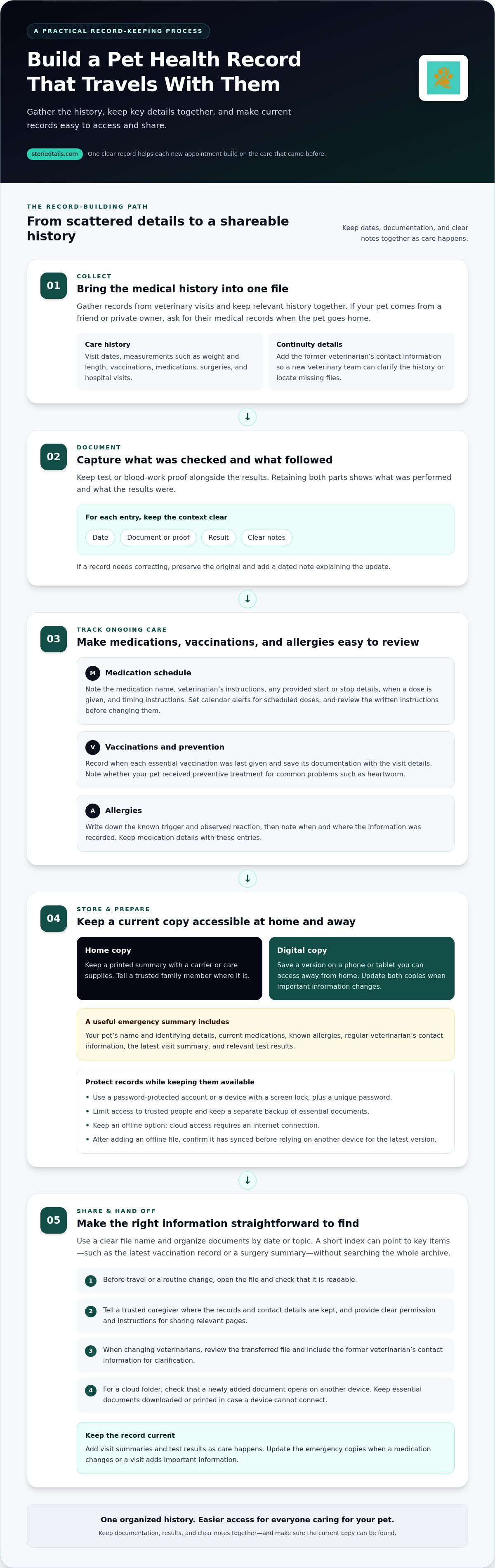
A clear record helps each new appointment build on the care that came before. To keep track of pet health records, save veterinary visit dates, measurements such as weight, vaccination details, medications, surgeries, hospital visits, and test reports with results. Keeping these details together gives you a practical history to share with the people caring for your pet.
Important details can easily end up in different places: a vaccination note in a folder, a test result in an email, or medication instructions remembered only from a conversation. A simple, consistent system makes information easier to find and helps family members stay on the same page.
This guide covers what to record, how to organize and access your pet’s health information, and how to share vaccination and appointment details with a veterinarian or loved one. It also explains what to gather when changing veterinarians or welcoming a pet with an existing medical history, so their care can reflect the history you’ve kept.
Key Takeaways
- Build a useful medical history with visit dates, measurements, vaccinations, medications, procedures, and both test documentation and results.
- Keep a current copy of essential health details somewhere accessible, so you can find and share them when care is needed.
- When changing veterinarians, review the file being transferred and include the previous veterinarian’s contact information to help clarify the history.
- Track when vaccinations were last given and whether your pet received preventive treatment for common problems such as heartworm.
- Use a consistent way to note appointments, follow-up instructions, and reminders so important details are easier to revisit.
Information to include in a pet’s medical history
A reliable way to keep track of pet health records is to gather each document in one organized file. Include dates, results, and clear notes that help explain your pet’s care.
Medical History Details
Record veterinary visit dates, measurements such as weight and length, vaccinations, prescribed medications, surgeries, hospital visits, and test results. Keep proof that a test or blood work was performed alongside the results, so the file shows both what was checked and what followed. Add the former veterinarian’s contact information. If a pet comes from a friend or private owner, ask for relevant records when the pet goes home.
Medication Schedules and Reminders
For each prescribed medication, note its name and the veterinarian’s instructions, including any start or stop details provided. Record when a dose is given and any timing instructions, so family members can follow the same plan. Set a calendar alert for scheduled doses and review the written instructions before changing it. Keep prescription details with the pet’s medical file.
Pet health record apps may be free or subscription-based, depending on their pricing models. Before choosing where to keep your notes, compare how each option handles storage, access, and sharing.
Digital records can be stored in a password-protected account or on a device with a screen lock. Use a unique password, limit access to trusted people, and keep a separate backup of essential documents. These steps help protect personal details while keeping records available to the people who need them.
Vaccination, Medication, and Allergy Tracking
Record the date each essential vaccination was last given and save its documentation with the veterinary visit details. Note whether your pet received preventive treatment for common problems such as heartworm. For allergies, write down the known trigger and observed reaction, then note when and where the information was recorded. Keep medication details with these entries so the veterinary team can review the history together.
Recent, accurate medical records can make it easier to obtain pet insurance or switch providers. Keep visit summaries and test results together, then add documents as care happens. If a record needs correcting, preserve the original and add a dated note explaining the update.
The former veterinarian’s contact details give a new veterinarian a way to clarify your pet’s medical history or locate missing files. Keep them with the records so they are available when needed. A clear point of contact can support the handoff, but it does not replace the documentation.
For tests or blood work, keep proof that each was performed alongside the results, rather than retaining only one part of the record. If a pet comes from a friend or private owner, ask for relevant medical records when the pet goes home. This lets the existing history travel with the pet, while the former veterinarian’s contact information remains available for clarification.
Keeping records accessible in emergencies
During an urgent visit, a clear, portable summary can help you share relevant details without searching through scattered files. Prepare a home copy and a digital version, and keep both current.
Emergency Record Access
Create a brief emergency summary with your pet’s name, identifying details, current medications, known allergies, and regular veterinarian’s contact information. Add the latest visit summary and any test results that may help explain ongoing care. Keep the summary easy to find, not buried among older paperwork.
Choose an arrangement that works for everyone who may care for your pet. Keep a printed copy with a carrier or care supplies, and tell a trusted family member where it is. Save a digital copy on a phone or tablet you can access away from home. Update both copies when a medication changes or a visit adds important information.
Before travel or a change in routine, open the file and make sure it is readable. Give a caregiver clear permission and instructions for sharing relevant pages with a veterinary team. A short index can point to specific documents, such as the latest vaccination record or a surgery summary, without requiring a search through the entire archive.
Keep a simple access checklist beside the records:
- Confirm the printed summary matches the latest digital copy.
- Show a trusted caregiver where the file and contact details are kept.
- Use descriptive filenames, such as “recent visit summary,” to find documents quickly.
Cloud Access and Syncing
A cloud-based folder can make records available across devices, such as a phone and home computer. Give the folder a clear name, organize files by date or topic, and open a newly added document on another device. This quick check confirms that the copy is available where you expect it.
Cloud access requires an internet connection, so keep an offline option for times when a device cannot connect. Download essential documents to your phone or keep a printed summary at home. If you add a file while offline, confirm it has synced after reconnecting before relying on another device to show the latest version.
Protect access with a device passcode and a strong, unique account password. Share access only with people who help care for your pet, and remove it when it is no longer needed. Keep personal files separate from broadly shared folders, and review sharing settings when you add a caregiver or replace a device.
For a dedicated way to organize these details, pet health record management can keep your pet’s care history in one accessible place.
Sharing records with family and veterinarians
Sharing a complete file helps family members and veterinary teams work from the same history. Use a clear process for permissions, transfers, and updates.
How long should you keep veterinary records? Preserve the full file throughout your pet’s life and keep it afterward for future reference. Earlier test results, procedures, and medication notes can help explain later care.
Rules for releasing and transferring veterinary records vary by U.S. state, including whether a veterinarian may give an owner a copy. Before a transfer, identify the documents you need and follow the veterinary office’s process for sending them.
Requesting records from a veterinarian
Contact the veterinary office that holds the file and request a copy for your records or a transfer to another veterinarian. Specify the documents you need, such as visit summaries, vaccination details, test reports, medication history, and surgery records. Include your pet’s identifying information so staff can find the correct file.
Ask how the office will deliver the copy and whether it can send the records directly to the new veterinary team. Veterinary offices commonly send records to a new veterinarian by mail or fax. Keep a copy for yourself when available, and note the date of your request and the documents received.
Transferring records to a new veterinarian
When changing veterinarians, ask the former office to send the file directly to the new practice. Review the record and check that the transfer includes all relevant documentation. For example, compare visit summaries with available test results and surgery notes rather than assuming one summary contains every detail.
Give the new veterinarian the former veterinarian’s name and contact information. This can help clarify the medical history or locate missing files. If you notice a missing report, tell the new office which test or visit needs follow-up, then request the document from the former practice.
Sharing with family members
Choose one shared location for the current record, then tell each caregiver how to find it. A family member taking your pet to an appointment may need the latest medication list, vaccination details, and previous visit notes. Agree on who adds documents after each appointment, so updates don’t remain in separate inboxes or folders.
Limit sharing to people involved in your pet’s care. Before sending a file, review it for personal information the recipient doesn’t need. A caregiver who only needs appointment instructions may not need access to the entire archive.
For each transfer, briefly note what was sent, when it was sent, and which office received it. This makes it easier to follow up on missing paperwork and keeps family members aligned with the veterinary team.
Vaccination tracking
Keep each vaccination entry with its supporting veterinary document, then update the record after every appointment. For travel within the United States, carry your pet’s veterinarian-issued vaccination record with vaccine names and administration dates. Requirements depend on the destination and travel arrangements, so identify the applicable documents before leaving.
Build a clear vaccination timeline
For each vaccination, record the vaccine name, date given, and veterinary office. Save the certificate or visit summary with the entry, connecting your notes to the original documentation. At minimum, keep the date each essential vaccination was last given and note whether your pet received preventive treatment for common problems such as heartworm.
Use a consistent format for every entry. For example, write “rabies vaccination, administered on [date], veterinary office [name]” using the details on the record. Add follow-up timing provided by the veterinary team rather than calculating a due date yourself. If your pet has records from different clinics, arrange them by date to make changes in care easier to follow.
Make the record useful at appointments
Before a veterinary visit, open the latest vaccination entry and compare it with the document you received. Note any missing certificate or unclear date, then bring the question and available paperwork to the appointment. Afterward, add the new document and update the timeline while the details are fresh, including the clinic name and any instructions in the visit summary.
Keep vaccination history separate from reminders. The history shows what was administered and when; a reminder points to a future action noted by the veterinary team. Label each clearly so a caregiver doesn’t mistake a planned appointment for proof that a vaccine was given. If a record is corrected, retain the original and add a dated note describing the change.
Prepare records for travel and shared care
For a trip, save the veterinarian-issued record where you can access it away from home, and carry a readable copy with your travel documents. Check that the pet’s identifying details match those on the record. If a family member is handling the trip, share the vaccination document and veterinary office contact details before departure.
Travel requirements can differ by destination and route, so use those details to identify the documents that apply. Keep the vaccination certificate with relevant appointment records, and make sure the copy you carry is legible. An organized, dated record helps you explain your pet’s vaccination history without relying on memory.
Vet appointments and reminders
A consistent appointment routine makes each visit a useful part of your pet’s care history. Record what happened, note any follow-up, and set reminders based on the veterinary team’s instructions.
Record the purpose and outcome of each visit
After an appointment, save the date, veterinary office, reason for the visit, and any written summary. Add the main concern discussed, examinations or tests performed, and the recommended next step. For example, note if a follow-up visit was advised to review a test result, then attach the report when it arrives.
Separate your observations from the veterinary team’s findings. You might write, “scratched ears before visit,” followed by the clinic’s recorded assessment and instructions. This distinction helps you remember what you noticed without presenting personal observations as a diagnosis. Keep appointment notes in chronological order so the sequence of visits and changes is easy to understand.
Set reminders from written instructions
Use a calendar or reminder tool for appointments, requested follow-ups, or medication schedules. Enter the date and time provided by the veterinary office, along with the clinic name and visit purpose. Add a brief preparation note, such as bringing a medication container or the latest test report, when requested.
When a visit leads to a new instruction, update the reminder and medical record separately. The reminder prompts an action; the record preserves the veterinary team’s advice. If a plan changes, revise the calendar entry and keep the visit note that explains the change. This gives family caregivers a clear reference instead of relying on memory or an outdated alert.
Make appointment details easy to use
Keep the regular veterinary office’s contact details with upcoming appointments. For a shared household calendar, include only what a caregiver needs, such as the visit time, clinic, transport plan, and documents to bring. After the appointment, mark it complete and add the visit summary to your pet’s file.
Review upcoming entries when planning travel or arranging care with another family member. This simple check can reveal a scheduling conflict or show that someone else needs the appointment details. Base reminders on instructions already provided, rather than using calendar alerts to decide when your pet needs care.
For a single place to preserve appointment notes alongside your pet’s health history, explore pet health record management.
StoriedTails: Digital pet memorial and community hub
StoriedTails brings pet health record management together with a digital pet memorial and community hub. It helps you preserve practical care details while honoring the life and story of a beloved companion. For a living pet, the Living Pets offering provides a place in this broader community to celebrate their continuing story.
Turn to StoriedTails when you want a dedicated space for health information and a meaningful way to keep your pet’s story close. Organized records can sit alongside the memories, milestones, and details that make your bond unique, creating a fuller picture of the life you share.
Visit storiedtails.com to explore StoriedTails at your own pace.
Carry Your Pet’s Care Story Forward
A well-kept record is more than a collection of documents. It reflects the care, decisions, and shared moments that shape life with a pet. As needs change or family members take turns helping, a thoughtful system keeps that history connected and easier to continue.
Choose a place for your records that is manageable enough to maintain. Start by adding the next document you receive, then make updates part of your regular care routine. Over time, small steps build a lasting account of your companion’s journey. If you want to keep track of pet health records while honoring the bond behind them, StoriedTails brings care and remembrance together in a digital pet memorial and community hub, with Living Pets and pet health record management.
Explore StoriedTails for your pet’s records, and take the next step at a pace that feels right for you and your family.
Frequently Asked Questions
What pet health records should owners keep?
Keep records that help someone understand your pet’s care and identity, including clinic summaries, prescriptions, and documents from previous caregivers. Add a note with your pet’s name, identifying features, and the veterinary office familiar with their history. If a new caregiver steps in, for example, the note can help them connect the right file to the right pet before sharing information with a clinic.
How to organize and track pet health records digitally?
To keep track of pet health records digitally, use a simple folder structure such as “Visits,” “Lab Reports,” and “Care Instructions.” Name each file with the visit date and document type, making it easier to find by date or test. Keep original files unchanged and add a dated note for corrections. Review the folder after appointments and remove duplicate copies that could be mistaken for current records.
How to create a pet health record for emergencies or travel?
Create a concise document with your pet’s name, identifying details, caregiver contact, regular veterinary office, and key care notes. For travel, keep relevant vaccination documents and itinerary-specific paperwork together, then carry an accessible copy. Add the date you prepared the packet and review it before departure. A caregiver should be able to identify the file and find the right document without sorting through your full archive.