Common Pet Health Record Keeping Mistakes to Avoid
By AutoSEO

Avoid pet health record keeping mistakes with tips for clear, dated records, medication details, secure storage, and sharing useful history with your vet.
Small gaps in a pet’s health records can make it harder to understand their history when care is needed. Common pet health record keeping mistakes include missing dates and times, scattered documents, unclear medication details, and notes that mix observations with assumptions. Keep entries in chronological order, add the date and time, and store each pet’s records in one central place.
It’s easy to assume a folder of receipts and a few remembered details will be enough, especially when everyday care feels familiar. A clear, current record can help you notice changes over time and share useful history with a veterinary team, so important details don’t depend on memory alone.
This article explains how to organize records chronologically, correct documentation errors, and choose digital or paper tools that fit your routine. It also covers protecting sensitive information and keeping important health details together, so your pet’s care history stays easy to understand and share.
Key Takeaways
- Build a clear timeline so changes in your pet’s health are easier to follow and share.
- Keep notes factual, readable, and detailed enough to make each care decision understandable.
- Choose paper or digital tools that fit your routine, and keep important records together.
- Protect private information with thoughtful access and storage choices.
- Include key health, medication, identification, and care details in your pet’s record.
1. Chronological documentation with dates and times
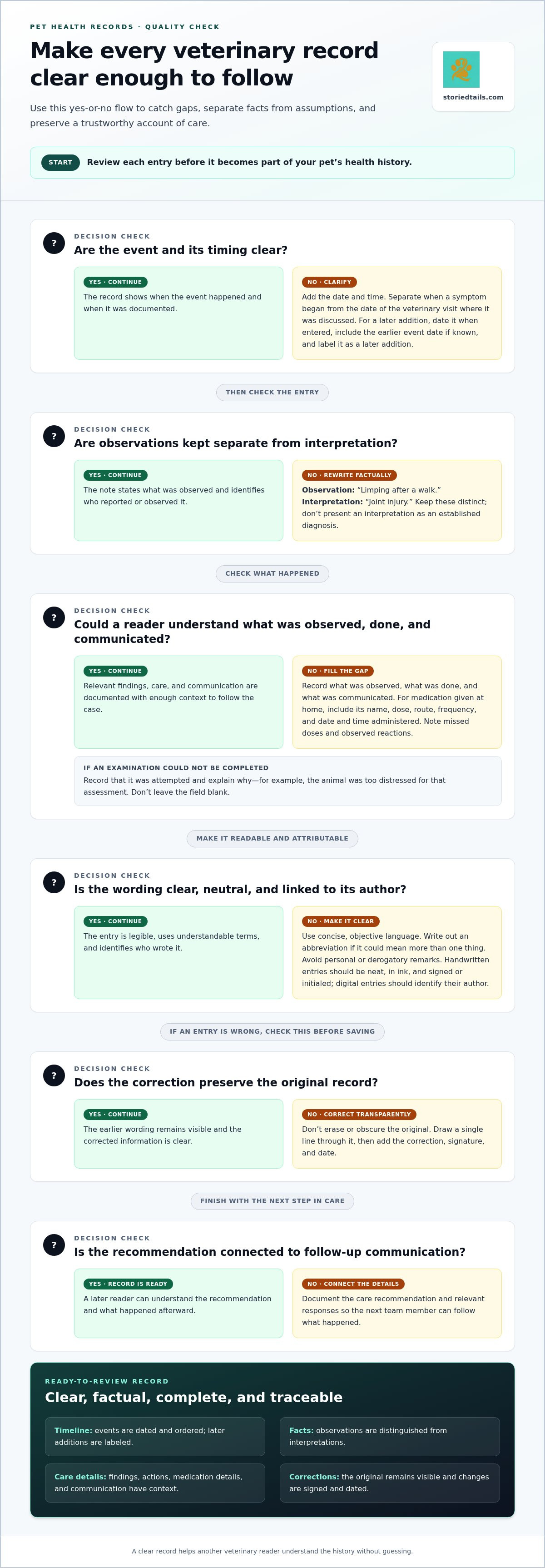
A useful timeline starts with the date and time of each examination, vaccination, medication change, symptom, and conversation. Add entries in the order events happened, even when several details arrive together. For example, record when a cough began separately from the date of the veterinary visit where it was discussed. This helps readers follow the medical history without confusing when a symptom occurred with when it was recorded.
Update vaccination and medication records after each vaccination, prescription change, or other relevant event. For medication given at home, note its name, dose, route, frequency, and the date and time administered. Record missed doses and observed reactions, too, so the timeline reflects what happened, not just what was planned. Keep these details with the relevant care instructions.
Use clearly labeled entries for vaccinations, allergies, and chronic conditions so you can find them quickly. Record each vaccination chronologically, including the date and available details from the paperwork. For an allergy, note the suspected trigger and observed reaction. For a chronic condition, include diagnosis information, ongoing signs, and treatment details. Update these entries when information changes.
Consistent entries across a veterinary team depend on a shared workflow. Practices can train staff to record dates and times, use clear terminology, and follow the same documentation process. Standardized abbreviations reduce confusion when another team member reviews the record. Each dated note should identify the interaction and describe relevant facts, rather than relying on shorthand only one person understands.
Keep pet identification documents alongside the health timeline, but distinguish them from medical entries. Store adoption or pedigree documents, the microchip number, and any local municipality license number with the pet’s identifying details. A separate folder for each pet helps prevent records from getting mixed up. Paper files can be arranged chronologically, with dividers for identification, vaccinations, and treatment.
If you add information later, don’t make it look as though you entered it at the time of the event. Date the entry when you add it, include the earlier event’s date if known, and label it as a later addition. This preserves the chronology and lets a veterinary reader distinguish when the event happened from when the record was updated. StoriedTails helps pet owners maintain accurate timelines that turn scattered details into a history others can follow.
Veterinary teams should document information as soon as possible after an examination, procedure, or communication. The Continental Kennel Club says tracking medical information over time improves continuity of care and helps veterinarians respond more efficiently during illness or injury.
2. Common veterinary record-keeping mistakes
A veterinary record is difficult to use when it omits what happened or blurs facts with interpretation. “Limping after a walk” describes an owner’s observation; “joint injury” suggests a diagnosis. Keep them distinct, and identify who reported or observed each detail. Clear records help another veterinarian understand the case without guessing what the original writer meant.
Some pet health record keeping mistakes are simple omissions: a missing examination finding, an undocumented conversation, or a medication entry without context. These gaps can disrupt continuity when another veterinarian reviews the file. Inaccurate details may also mislead decisions; an incorrect allergy entry or dose, for example, can affect how treatment history is understood. Record what was observed, what was done, and what was communicated.
Use concise, objective language instead of vague shorthand or personal remarks. “Owner declined the recommended test” is more useful than a judgment about the owner. Veterinary records should not contain derogatory statements about patients, clients, or other veterinarians. Standardized abbreviations and consistent terminology also reduce confusion. If an abbreviation could mean more than one thing, write out the full term.
Legibility matters in both paper and digital files. Handwritten entries should be neat, written in ink, and signed or initialed; digital entries should identify their author. If an examination couldn’t be completed, record that it was attempted and explain why. For example, note that the animal was too distressed for a particular assessment instead of leaving the field blank. This prevents an incomplete entry from being mistaken for an examination that was never considered.
Don’t erase or obscure an incorrect entry. Draw a single line through the original text, then add the correction, signature, and date. This keeps the earlier wording visible while clarifying the accurate information. A later reader can see what changed and who made the correction, rather than mistaking an altered note for the original record.
Another pet health record keeping mistake is leaving treatment plans disconnected from follow-up communication. When a care recommendation is made, record the recommendation and relevant responses so the next team member can understand what happened afterward. Review entries for unsigned notes, unclear abbreviations, missing findings, or unexplained changes. Correct errors promptly while preserving a clear account of care.
For owners who want one place to maintain their pet’s health history, organized pet health records can help keep a more complete account ready to share with the veterinary team.
3. Digital tools and automation
Digital records can keep a pet’s documents in one central hub, while paper folders and binders remain useful options. Choose a format you can maintain consistently, then gather clinic summaries, laboratory reports, medication instructions, and vaccination documents in one place. A mixed system can work, too: scan important paper records and save them alongside digital notes. The key is knowing where the current record is kept.
Cloud storage services such as Google Drive, iCloud, and Dropbox can make files accessible across devices. Create a separate folder for each pet and use clear file names, such as “Milo wellness visit” or “Luna lab results.” Add the document date to the name when it helps distinguish versions. Consistent labels make files easier to find than names like “uploads” or “documents.”
Electronic veterinary records can improve legibility and searchability, and they can store images and laboratory reports alongside notes. A clear photograph of a prescription label, for example, can help you refer to its written instructions. Digital records can also be updated in real time and shared with a veterinarian or pet sitter. Share the relevant details, rather than sending unrelated personal files.
For a personal record, use a simple routine after each appointment or care change. Save the clinic document, add any new instructions, and check the entry for accuracy before relying on it. If a detail is unclear, preserve the original document and mark your note as a question for the next conversation. This keeps your observations separate from veterinary instructions.
Veterinary practices can use voice-to-text tools and smart forms to capture information during or after an interaction. Automated reminders can prompt follow-up tasks, while online bookings can help organize appointments. These tools support documentation, but staff still need to review entries for accuracy. A reminder isn’t a completed record, and an automated transcript may need correction.
Practice teams can also link client communication to the patient record. For example, a message about a changed appetite can be stored with the relevant care history instead of remaining only in an inbox. Linking messages to the right patient preserves context when another team member reviews the file. Staff training should cover how to use the practice’s forms and tools consistently.
Automation works best as support for a clear process, not as a substitute for careful review. Before saving a digital entry, check that it belongs to the right pet, includes useful details, and can be found later. If you keep both paper and digital copies, decide which version is current and update the other when needed. This habit helps prevent conflicting files and keeps accurate records within reach.
4. Data security and confidentiality
A pet’s health history may include owner contact details, veterinary messages, medication notes, and diagnostic documents. Keep these records in a designated, protected location rather than scattering them across shared devices or inboxes. Store paper files securely at home and avoid leaving them visible in a vehicle. For digital files, use a private account and limit access to people who need the information.
Veterinary practices can protect sensitive client data with encrypted storage, role-based access, and secure backups. Encryption helps protect stored information from unauthorized viewing, while role-based access limits who can open or change records. A receptionist may need appointment details, while clinical staff need relevant medical notes. Assigning access by role helps keep information appropriately contained.
In the U.S., state rules and practice procedures govern access to veterinary records. Owners should request their pet’s history from the veterinary practice that holds it and shouldn’t assume human medical-record rules automatically apply to animal records.
Before sharing a file, consider what the recipient needs. A pet sitter may need feeding instructions, medication details, and an emergency contact, not the full health history. A veterinary team may need diagnostic results and treatment notes. Share relevant records securely, and avoid posting private documents in public groups or open community spaces.
Protect a digital account as carefully as the files it contains. Use a strong, unique password and enable an additional sign-in step when available. Don’t share login credentials with a pet sitter; send only the necessary information. If family members share a device, keep health documents in a restricted account or folder.
Backups help preserve records if a device is lost, damaged, or replaced. Keep a secure backup separate from the main device, and occasionally open a saved file to make sure it’s still readable. For paper records, store copies of essential documents separately from the originals. A vaccination summary or medication list can be especially useful when the main folder isn’t at hand.
When a veterinary practice handles client information, secure backups help maintain continuity if its main system becomes unavailable. Staff should receive clear instructions about who may view records, how information is shared, and where backups are kept. A consistent process reduces accidental exposure, such as sending one pet’s file to the wrong recipient. Owners can also review shared folders and remove access when a caregiver no longer needs it.
5. What information should be included in a pet health record?
A useful pet health record brings together identity, medical history, treatment, and everyday care details. Start with the pet’s name, age, gender, breed mix, weight, and coat color. Add a clear photo, microchip number, and relevant adoption or pedigree documents. These details help distinguish one animal’s file from another’s and support identification if the pet is lost.
Keep a medical history another veterinarian can understand without relying on your memory. Include vaccination history, spay or neuter status, surgical history, diagnosed conditions, allergies, previous adverse reactions, and current medications. For each medication, record its name, dose, route, frequency, and schedule. Include veterinary instructions and note any reaction or change you observe.
After an appointment, add the history discussed, physical examination findings, diagnostic results, treatments, and discharge instructions. Include relevant communication with the veterinary team, such as care instructions or follow-up plans. A SOAP note organizes clinical details into Subjective, Objective, Assessment, and Plan. The assessment distinguishes observed facts from interpretation, while the plan records proposed medications, diagnostics, procedures, and follow-up examinations.
Food and daily-care notes make the record useful beyond clinic visits. Write down the food brand, amount, timing, and frequency, along with supplements, special feeding directions, and the pet’s treat allowance. For a pet sitter, “give the prescribed dose with the evening meal” is clearer than “give medicine later.” Keep care directions consistent with the veterinary team’s instructions.
Growth details can reveal patterns a single measurement may not show. Record weight, body condition, physical development, vaccination history, and notes from routine wellness exams. For puppies and kittens, growth entries help track development and nutrition; for adult pets, they can show weight trends relevant to comfort and mobility. Add changes in diet, activity, behavior, or energy for context.
Keep emergency information easy to find. Include contact details for trusted friends or family, the primary veterinarian, a nearby 24/7 emergency clinic, and the Pet Poison Helpline. For ongoing care, organize the problem list by importance and note changes over time. This helps a veterinary team connect symptoms, test results, and treatment history when planning care.
Gather these details into one well-labeled record, then review it after visits or changes in treatment. Keep your pet’s health record organized alongside the details that make their story uniquely theirs.
Keep insurance information with the health record, alongside vaccination history, spay or neuter status, surgical history, health conditions, allergies, and current medications with their schedules and dosing instructions. Clearly record previous adverse reactions and chronic conditions, as well as medication history that may inform treatment decisions. For each visit, preserve the history, physical examination findings, diagnostic results, treatments, medication details, caregiver communication, and discharge instructions. Enter veterinary notes chronologically, including the date and time, so later readers can follow the pet’s care.
A complete medical history, including growth records, can support safer and more informed decisions when a pet needs advanced care or procedures later in life. In the assessment, document the problem list in order of importance and differential diagnoses from most to least likely. Keeping these details together gives the veterinary team a fuller picture of the pet’s health when considering care.
StoriedTails: Digital pet memorial and community hub
StoriedTails offers pet health record management alongside a digital pet memorial and community hub. Once your pet’s care information is organized, you can use these offerings to continue honoring the bond you share, whether your companion is part of your daily life or you’re preserving their memory. Living Pets also helps celebrate pets who are with us now.
Choose pet health record management when you want to keep your companion’s health history in view, and explore the memorial community when preserving a pet’s story feels meaningful. Each supports a different part of the relationship: attentive care, shared remembrance, and the everyday presence of a beloved animal.
Visit storiedtails.com to explore StoriedTails.
Make your pet’s story easier to carry forward
A record is more than a collection of documents; it’s a thoughtful account of the care and companionship that shape your pet’s life. Avoiding pet health record keeping mistakes starts with one manageable step: choose a home for the information, then add to it as new details arise. Consistency matters more than creating a perfect archive all at once.
As your pet’s needs change, the record can help keep their history close and share it with the people involved in their care. It can also hold the small details that make their story unmistakably theirs. Build that record gradually, with care and attention.
If you’d like to explore how StoriedTails can support your pet’s records and the memories you hold dear, contact StoriedTails to learn more. Each step you take to preserve your companion’s story is a meaningful act of care.
Frequently Asked Questions
What are the most common mistakes in keeping pet health records?
Common errors include duplicate files, unlabeled attachments, and entries that don’t identify who supplied the information. If a family member reports a new symptom, for example, note who reported it rather than presenting it as a veterinary finding. During a periodic review, compare documents for conflicting details, such as different medication instructions, and keep the source of each instruction clear.
How can pet owners safely store and back up health records?
Keep the main record in a private location and store a backup separately, so one lost device doesn’t remove every copy. Avoid public file-sharing links for records containing contact details or medical information. If a trusted caregiver needs access, share only relevant documents, then remove their access when care arrangements end. Note where the backup is stored so you can retrieve it when needed.
Are digital pet health record apps better than paper records?
Neither format is automatically better. Choose the one you can keep current and access when needed. Digital records may suit households sharing care across devices, while paper can be handy when traveling without device access. A simple hybrid approach can work: keep the main record in one format and a current, concise summary in the other, updating it when care details change.