Store Pet Medical Records Online: What to Keep and Share
By AutoSEO
Learn how to store pet medical records online, organize visits, vaccines, medications and test results, and share a complete history with your veterinarian.
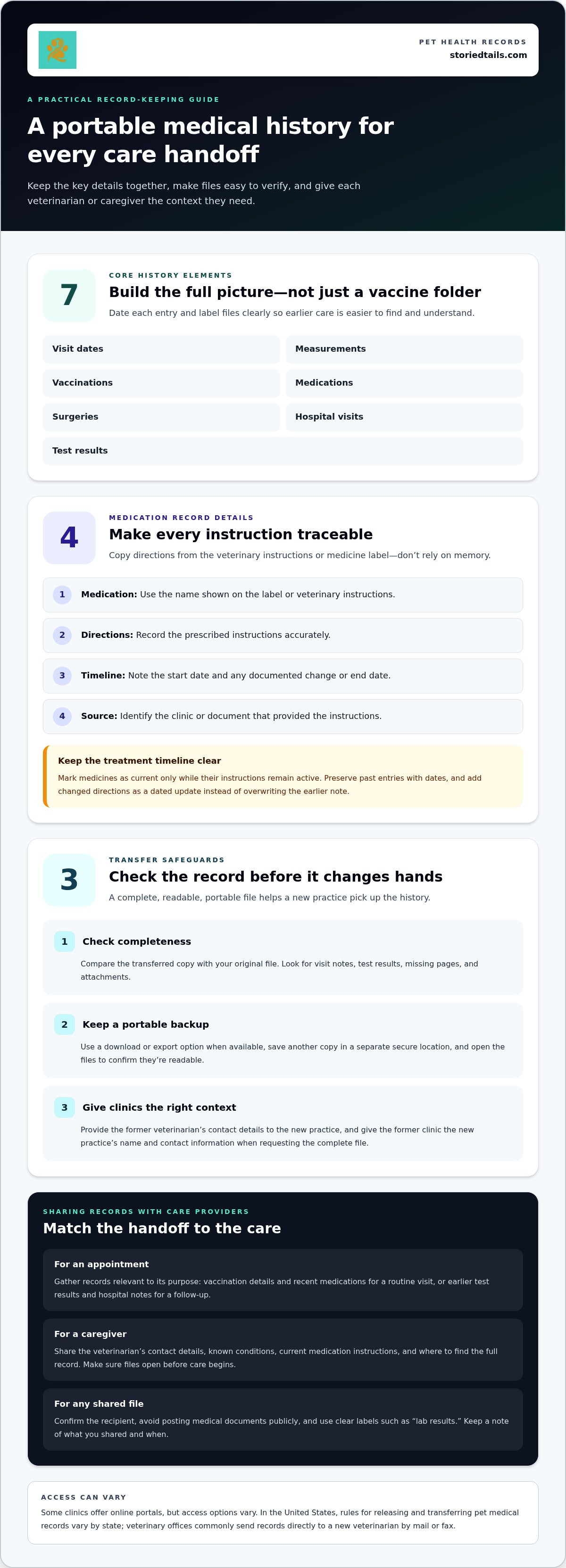
An online pet medical record is a living history, not just a folder of vaccination certificates. To store pet medical records online, keep veterinary records from your pet’s birth onward, including visit dates, measurements, vaccinations, medications, surgeries, hospital visits, and test results. A clear, current record makes it easier to share important details when your pet sees a new care provider.
Important papers and messages can end up scattered across drawers, inboxes, and appointment notes, even when you’re doing your best to keep them together. One organized record makes it easier to recall what happened and pass along your pet’s history when care changes.
This guide covers what to include, how to organize records online, and what to share with a veterinarian. You’ll also learn how to carry the record forward when your pet joins your family or changes care providers, so their history stays close at hand.
Key Takeaways
- Build a rounded medical history with visit notes, test results, procedures, vaccinations, and medication details.
- Keep records ready to share when your pet joins your family or begins care with a new veterinarian.
- Track essential vaccination dates, heartworm prevention, known conditions, and current medications together.
- Organize digital copies so key documents are easier to find and pass along when care changes.
- Compare record-keeping options by how well they support the details and sharing needs that matter to you.
Sharing records with care providers
A useful record helps a veterinarian connect today’s concern with earlier care. Share the full medical history, not just the latest vaccination page. Include visit dates, measurements, vaccinations, medications, surgeries, hospital visits, and test results. For example, an earlier test result may provide context at a new appointment. Date each entry and label files clearly, such as “vaccination record” or “lab results.”
When you adopt a pet from a shelter, ask for the medical file to pass on to the new veterinarian. If your pet comes from a friend or private owner, request relevant records when your pet comes home. Ask for the available history in a format you can save, then add it to the pet’s online record. This gives you a starting point for the next appointment.
Before an appointment, gather the records relevant to its purpose. A routine visit may call for vaccination details and recent medications, while a follow-up may require earlier test results or hospital notes. Send files using the method the veterinary practice provides, and include your pet’s name and appointment date in your message. If a document is unclear, point out the section rather than trying to interpret it yourself.
Caregivers need a concise, practical handoff, too. Share the veterinarian’s contact details, your pet’s known conditions, current medication instructions, and the location of the full record. For example, someone caring for your dog can find medication notes and appointment details without searching through old test results. Keep instructions consistent with what the veterinarian provided, and tell the caregiver where to find updates.
- Share only the record or instructions needed for the caregiver’s role.
- Make sure the caregiver can open the files before care begins.
- Update the shared information when a veterinarian changes the care instructions.
Before sharing a file online, confirm the recipient and avoid posting medical documents publicly. A clear file name, such as “Milo allergy visit,” helps a veterinary team or trusted caregiver recognize its contents. Note what you shared and when, so you can follow up if an appointment requires another document. Keep the complete history available, while tailoring each handoff to the care at hand.
Transferring records when changing veterinarians
A new veterinarian needs a dependable account of your pet’s care, not just a recent visit summary. Keep the former veterinarian’s contact details and review the transferred file to ensure it includes relevant documents.
Uploading veterinary documents
Uploading veterinary documents means adding readable, clearly labeled copies of clinic records to your digital file. This keeps information together when you change practices or prepare for an appointment. Save each document with its date and type, such as “April lab results” or “surgery discharge notes.” Compare uploaded files with the originals to catch missing pages or attachments.
Clinic portals for pet records
Some veterinary clinics offer online portals for accessing or downloading records. Portal access varies, so ask the original clinic how it provides copies. In the United States, rules for releasing and transferring pet medical records vary by state. Some states allow veterinarians to give owners copies, while others prohibit it. Veterinary offices commonly send records directly to the new veterinarian by mail or fax.
Backing up and exporting records
Backing up means keeping another copy of your records; exporting means saving files in a format you can move to another service. Use the download or export option when available, then save the files in a separate, secure location. Open the saved files to confirm they’re readable, and keep original documents alongside your organized copies. This gives you a portable record if you change how you store it.
To request a transfer, give the former veterinarian the new practice’s name and contact information, and ask for the complete file. Give the new veterinarian the former veterinarian’s contact details so the clinics can clarify your pet’s history. Compare your original file with the copy sent, including visit notes, test results, and attachments. If a relevant document is missing, identify it by date and type when following up.
For a telehealth appointment, share relevant records beforehand, such as a recent test result or medication list. Keep the former veterinarian’s information handy in case the new veterinarian needs context about earlier care. Clear dates and documents can help with a virtual discussion just as they can at an in-person visit. Save any resulting notes with the rest of your pet’s history, so the record follows them across care settings.
Medications and known conditions
A medication list is most useful when it shows what your pet takes and where each detail came from. Record the medication name, the veterinarian’s instructions, and when treatment began. Add the prescribing clinic and the date of the latest instructions. For example, “see current label” is clearer than relying on memory about how a medicine is given.
Keep past and current treatments distinct. Mark a medication as current only while its instructions remain active, and preserve earlier entries with their dates. If a veterinarian changes the plan, add the new directions as a dated update rather than overwriting the older note. This creates a clear timeline for a new veterinarian reviewing what your pet has received.
- Medication: use the name shown on the label or veterinary instructions.
- Directions: copy the prescribed instructions accurately, without rewriting them from memory.
- Timeline: note the start date and any documented change or end date.
- Source: identify the clinic or document that supplied the instructions.
Known conditions also deserve a concise, dated record. Use the diagnosis or wording in the veterinary document, then attach or identify the related visit note or test result. For example, if an allergy appears in a clinic record, note the date and source rather than adding your own interpretation. Keep personal observations separate from documented diagnoses so it’s clear where each detail came from.
Make essential prevention history easy to find. Include when essential vaccinations were last administered and whether your pet received heartworm prevention. Keep the relevant dates and documents together, and distinguish completed care from planned or upcoming care. If a vaccination record contains multiple entries, label the copy so the latest administration date is easy to locate.
Before sharing a medication and condition summary, compare it with the latest veterinary documents. Check that names and directions match, older instructions are visibly dated, and vaccination and heartworm-prevention details are included. If the record shows a change, preserve both the earlier and newer entries. This helps a veterinarian follow the sequence without mistaking an old instruction for the current plan.
For a caregiver, prepare a separate, concise view containing only current care instructions and the veterinarian’s contact information. Keep detailed condition notes and past medication history in the full record. For example, a caregiver can follow the written instructions and know where to find the complete history if questions come up. This keeps daily care clear while preserving the fuller record for veterinary appointments.
Storing pet medical records online
A complete digital history keeps your pet’s care details together and easier to find. Organize it so every record is dated, readable, and ready to share.
Digital storage for pet records
Digital storage means keeping veterinary documents and health details in an online record you can access when needed. A complete history can help you explain earlier care during an appointment or when changing providers.
Build the record from your pet’s birth onward, including visit dates, measurements, vaccinations, medications, surgeries, hospital visits, and test results. Add each new document as it arrives, then label it by date and type. For example, “May visit summary” is easier to recognize than “scan 4.” Keep original files alongside any notes you add, so the source remains clear.
Use a simple structure that matches how you search for information. Group visit summaries, laboratory results, medication documents, and vaccination records under clear labels. Name files with your pet’s name and document type, such as “Milo blood test results.” Before sharing a file, open it to make sure the pages are readable and complete.
Protect access with a private account and strong password, and share documents only with their intended recipient. Avoid public folders for medical files. Keep a separate copy of important documents in a secure location you control. An accurate, up-to-date history can make it easier to change providers or apply for pet insurance, so add new records as they arrive.
Free and paid pet health record apps
A free app may offer a place to collect health information, while paid plans may include additional options. Compare what each plan provides to choose a record-keeping method that suits your needs.
Start with the essentials: can you add visit documents, find them later, and share them with a veterinarian? Consider whether you can save or export your records; a portable copy helps if you change services. A free option may be enough when your records are straightforward and its tools support your routine.
Paid-plan costs depend on the provider and features. Storage capacity, sharing tools, and additional record-management options may affect your choice. Compare those details with how you use your pet’s history. For example, a household sharing care may value easy access, while one person may mainly need a place to organize documents.
Before choosing a service, find out how you can retrieve your files and keep a separate copy. A useful service supports an accurate history without making it difficult to move records later. Whatever the plan, organize visit dates and documents, and add new information as your pet receives care.
Which pet health record apps are free, and what do paid plans cost?
A free pet health record app keeps useful record-keeping features available without payment, rather than offering access only during a trial. Paid plans have costs set by each service, so compare the plan details and price shown before choosing. The right fit depends on how you organize, retrieve, and share your pet’s documents.
Start with the features you need. Can the app store veterinary documents, keep entries organized, and help you find a particular visit later? For example, a pet owner with a few vaccination records may need fewer tools than someone managing test results, medication notes, and hospital documents. Compare your needs with the features included at no cost.
Read the plan description carefully. “Free” may mean a limited plan, a trial period, or a basic tier with fewer tools than paid plans. Check whether you can keep records after a trial ends and what happens to stored documents if you stop paying. Those details matter if the record will hold years of care history.
For paid plans, compare the stated fee with the features you would actually use. Check whether the plan includes the storage and sharing options you need, and whether its terms explain how to download or export records. Avoid paying for features that don’t support your routine. A short list of must-haves, such as document uploads, clear organization, and portable copies, can help you compare.
- Access: Can you open records when preparing for a veterinary visit?
- Organization: Can you locate a dated test result or vaccination document?
- Sharing: Can you provide the right record to a veterinarian or caregiver?
- Portability: Can you save your files if you change services?
Compare plans side by side against the same needs. Note the fee, included tools, renewal terms, and export options. A free plan may suit a simple archive; a paid plan may be worth considering if its added tools solve a specific need. Revisit the comparison when your record-keeping needs change, rather than choosing by price alone.
For a place to organize your pet’s health history, manage your pet’s health record alongside the care details you want to keep accessible.
StoriedTails: Digital pet memorial and community hub
StoriedTails brings pet health record management together with a digital memorial and community hub. If you’re organizing care details while cherishing your pet’s story, StoriedTails offers a place for practical records and meaningful remembrance. The Living Pets space also celebrates the pets who are part of your family today.
Turn to StoriedTails when you want your pet’s health history alongside the moments and memories that make their life uniquely theirs. Bringing those parts of your bond together can help you care for the present while honoring the story you’re building over time.
Visit storiedtails.com to explore StoriedTails.
Make record keeping part of your care routine
Your pet’s history grows through everyday moments of care, and a small habit can keep the details from becoming scattered. Choose a regular time to update the record, such as after an appointment, and keep the routine simple enough to maintain. A clear, well-kept history can provide continuity when care changes and preserve the story of the bond you share.
If you’re ready to store pet medical records online, choose a record-keeping home that’s easy to revisit and share. StoriedTails brings pet health record management together with a digital pet memorial and community hub, including Living Pets. It offers a way to manage practical records while honoring the place pets hold in family life.
Contact StoriedTails about your pet’s records to explore a thoughtful next step. With each detail cared for, you can keep your pet’s story close as it continues to unfold.
Frequently Asked Questions
What can I keep in the record?
Keep veterinary documents alongside useful identification details, such as your pet’s microchip number. A microchip number has fifteen digits, so save it exactly as shown in the registration information. You can also keep referral letters, discharge instructions, and notes about where original paperwork is stored. For example, a “specialist referral” entry can help you find the right document before a new appointment.
What apps and websites let you store pet medical records online?
You can use a pet health record service or a veterinary clinic’s portal when it provides record access. StoriedTails offers pet health record management within a digital pet memorial and community hub. Compare options by whether they help you organize records and share them with a veterinarian. Before relying on a service, consider whether you can keep a separate copy of the files you add.
How do I upload and organize a pet's vaccination, prescription, and test records online?
Scan or photograph each document clearly, then label it with your pet’s name, record type, and date. For example, save a prescription as “Milo, prescription, May visit,” and place a test result in its own category. Open each uploaded file to check that the text is readable and every page is present. Keep a separate original copy to compare with the digital version.
Can I share online pet medical records with veterinarians, pet sitters, or emergency clinics?
Yes, you can share relevant records with a veterinarian, pet sitter, or emergency clinic using the sharing options available to you. Choose documents for each recipient: a sitter may need care instructions, while a veterinarian may need visit notes or test results. Send files privately, identify your pet clearly, and tell recipients how to reach you or your regular clinic.
Are online pet medical records secure and encrypted, and who can access them?
Security and encryption vary by service, so don’t assume every record platform offers the same protections. Review the service’s privacy and security information to understand how access works and whether it describes encryption. Use a strong, unique password, protect the email account used to sign in, and share records only with intended recipients. Avoid public links or shared folders for private veterinary documents.
What records should I keep for a pet, and how long should I retain them?
Keep a continuous history of veterinary care, including visit documents, vaccination records, prescriptions, test results, and procedure notes. Retain the history throughout your pet’s life, and preserve it afterward if it remains meaningful or useful for family records. Older entries can help explain past care if your pet sees a new veterinarian or needs follow-up for an earlier condition.
Are there privacy laws or rules for storing and sharing pet medical records in the United States?
Rules can depend on the situation and the state, so don’t assume every clinic handles records the same way. In the United States, rules for releasing and transferring veterinary records vary by state. Ask the clinic how it releases records, and review an online service’s privacy terms before uploading documents. Share only the information each recipient needs, especially when sending records to a caregiver.